Mutagent Blog · Announcements
Introducing Architech & the Software Factory
Architech is our harness for software engineering: an Orchestrator and four agents that plan, build and review changes in your repository. The Software Factory runs them against your board, issues in, reviewed pull requests out, on your laptop or on Mutagent Cloud. Early Access.
Mutagent Blog · 2026-10-30 · by Burak Ozafsar
~12 min read
Today we shipped Architech and the Software Factory. Architech is our harness for software engineering. You run it in your repository, describe a change, and a small team of agents plans it, builds it, tests it and reviews it with you. The Software Factory runs that same team against your board. Issues go in, reviewed pull requests come out, on your laptop or on Mutagent Cloud.
Both are Early Access. There will be bugs, and this post is the guide.
Inside Architech
Start architech in a project directory and you are in an Architech session. The session is the Orchestrator. It reads your project, hands each piece of work to the agent that owns it, and brings the result back to you. You talk to one session, and the agents do the work behind it.
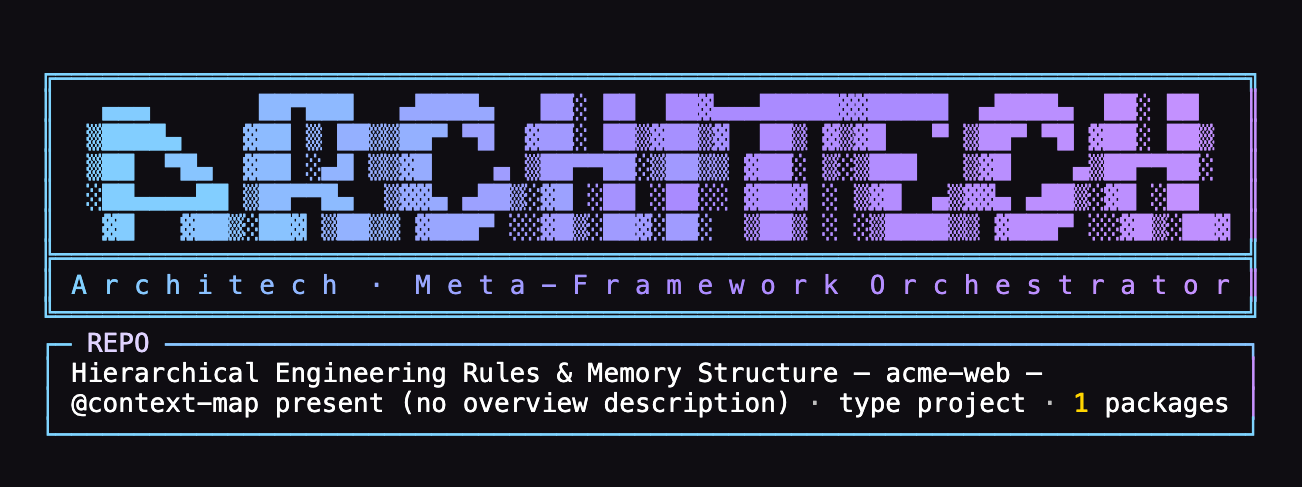
The banner opens every session, with the repository and its project context right under it. Further down, the dashboard shows the skills and agents loaded, the model, and whether onboarding and its checks have run.
| agent | what it’s for |
|---|---|
| Orchestrator | your session, coordinates the work, tracks progress, follows your approval and merge rules |
| Architect | turns what you want into requirements, a design and tasks the other agents can run |
| Developer | writes the change and its tests in your repository |
| LLM-Whisperer | handles work on LLM agents, prompts and model behavior inside your codebase |
| Reviewer | checks the work, and never reviews a change it wrote |
That last row is on purpose. An author reviewing its own diff is the cheapest review there is, and it is worth about that much. Every change gets read by a second session that didn’t write it.
Before anyone touches code, /onboard sets the project up. It asks whether this is new code or an existing repository, whether it may scan the repository to draft project context and engineering rules, and which GitHub Project board to use, if any. It never scans without asking, and it shows you a diff before it writes anything. The agents read that context and those rules before every change.
The commands you will use most live inside the session.
| command | what it does |
|---|---|
/login, /model | sign in to your model provider and pick a model |
/onboard | set up project context, engineering rules and an optional board |
/spec | plan a change, from requirements to a design to tasks |
/publish | turn the tasks into GitHub issues |
/dispatch | send issues to agents that work in parallel |
/execute | plan and act in one pass, for a small change |
/review | code review of an issue or a pull request |
/ship | review, CI, merge, and watch what happens after |
/monitor | watch CI, deploy health and production |
/status | see what’s running |
Those chain into two paths. The full loop is /spec, /publish, /dispatch, /review, /ship. The fast path for a small change is /execute, /review, /ship. /help lists everything else.
You can also just describe the change in plain English. Around that core sit sub-agents that run in parallel, workflows that fan one script out over a list, a background Monitor for long commands, a read-only /trace viewer for session logs, and your own MCP servers.
The Software Factory
The Software Factory takes an issue from your board and returns a reviewed pull request. Each stage is its own agent session with one job, and the run stops twice for you.
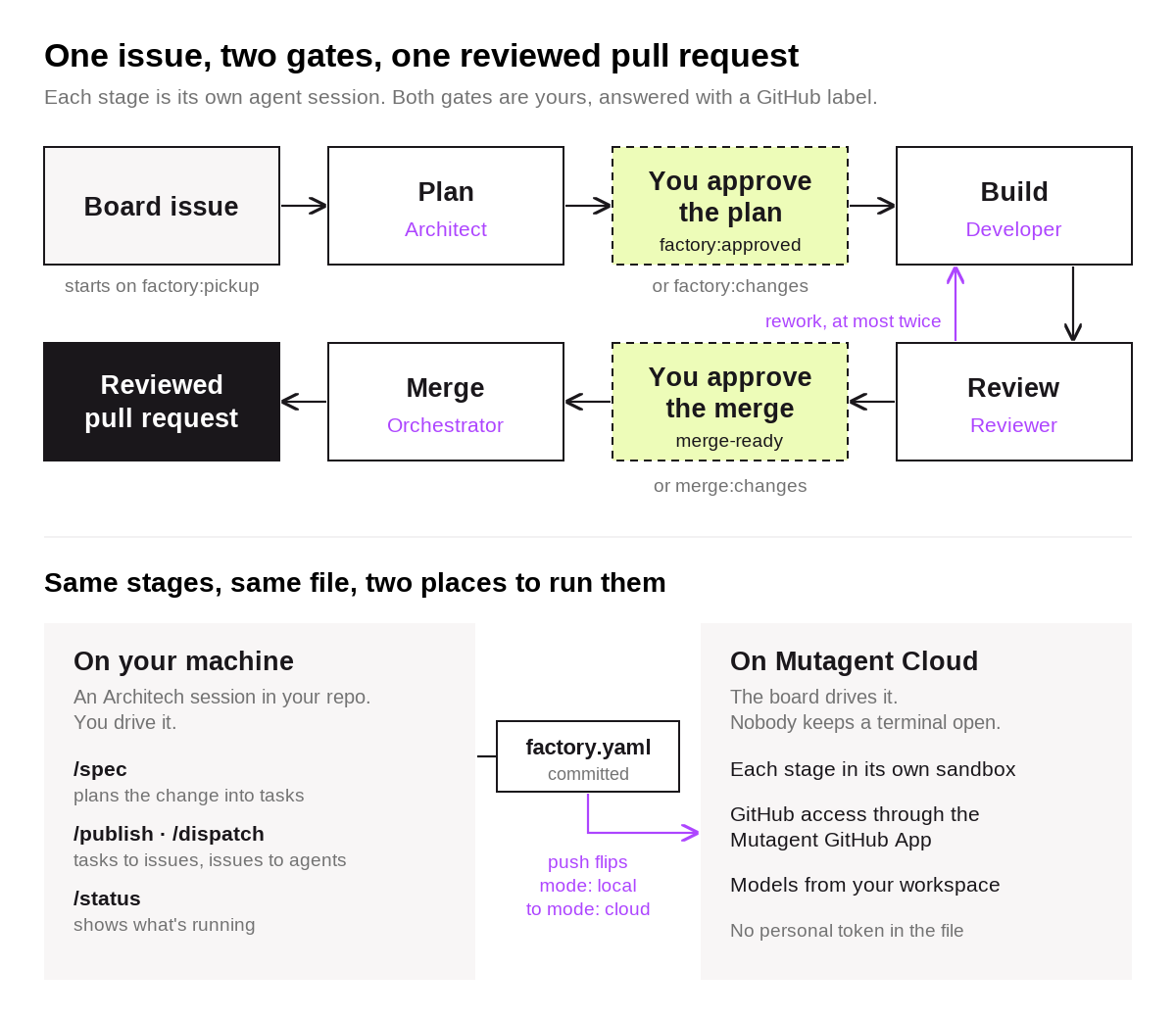
| stage | who runs it | what happens next |
|---|---|---|
| plan | Architect | the plan is posted on the issue, and the run waits |
| plan gate | you | approve it and build starts, or ask for changes and it plans again |
| build | Developer | the change gets written with its tests, and a pull request opens |
| review | Reviewer | approves, or sends the work back to build, at most twice |
| merge gate | you | approve it and the change lands, or send it back to build |
| land | Orchestrator | the reviewed change is merged |
Everything between the two gates runs without you. Our own board has worked this way on Mutagent Cloud since October 27.
One file
The factory is one committed file, .architech/factory/factory.yaml. Onboarding writes it when you pick a board, and you review changes to it like code. Credentials never go in it.
apiVersion: architech/factory/v2
kind: Factory
metadata:
  name: factory
mode: local                      # a push to Cloud sets cloud

board: main
boards:
  main:
    provider: github
    ref: { owner: acme, project: 2 }

repos:
  - name: acme/web
    defaultBranch: main
    zones:
      protected: ["src/auth/**"] # a person approves these at least once

agents:
  roles:
    developer: { model: provider:model, effort: medium }

labels:
  pickup: ['factory:pickup']
  approvePlan: 'factory:approved'
  approve: 'merge-ready'

policy:
  autonomy: calibrating

limits:
  maxActiveRuns: 4               # more wait in a queue

triggers:
  - name: pickup
    on: { source: board, event: label, label: 'factory:pickup' }
    run: { stage: plan }
Each block controls one part of the run.
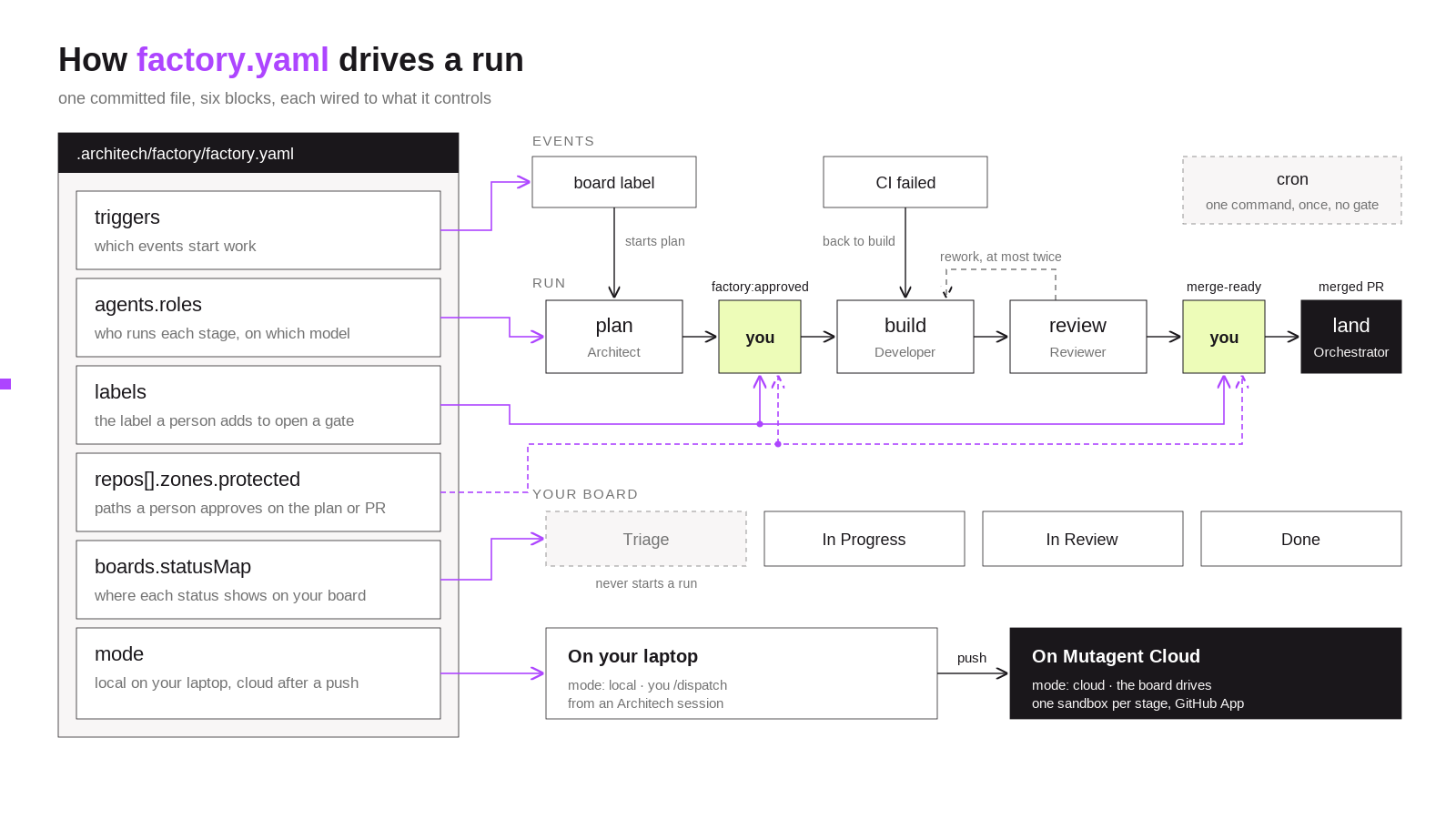
| block | what it controls |
|---|---|
boards | which board the factory reads, GitHub or Linear, and statusMap to map its statuses onto the columns you already have |
repos | the repositories it may change, their default branch, and protected paths |
agents.roles | which model and effort each agent runs with, and which Environment its sandbox loads |
labels | the label names for pickup, the two gates, hold and the rest |
policy | the autonomy preset, and per-stage overrides for plan and merge approval |
limits | how many runs are open at once, and dollar caps per run and per day |
triggers | which events start work |
mode | local on your laptop, cloud once you push |
Any key the file language doesn’t have is refused, and the error tells you which key to use. A typo costs you a red check. We take that trade, because a file that silently drops part of what it says would run something other than what you wrote. architech factory validate checks the file offline, and architech factory schema prints every field with its default.
Labels, merges and autonomy
You answer both gates with a label, in the issue or pull request sidebar or on the board.
| gate | to approve | to send it back |
|---|---|---|
| plan, on the issue | add factory:approved, and build starts | comment your notes, then add factory:changes, and the Architect plans again with them |
| merge, on the pull request | add merge-ready, and the reviewed change lands | comment your notes, then add merge:changes, and the work goes back to build |
Only a person counts. The label has to come from a GitHub user with write access to the repository, and the approval is recorded under their login. A label added by a bot, an app or the factory itself is ignored. Moving a card approves nothing either, because a board can’t tell you who moved it, so the factory replies with a comment asking for the label. A bare /approve comment still works. /approve but add tests is refused, because the correction belongs in a comment followed by the changes label.
The plan and changes labels are used once, and the factory removes them after reading them. merge-ready stays on the pull request until the merge. If new commits land after you approve, it comes off, and you approve again with the new commits in view. What merges is always the change that was reviewed.
Two labels override the gates. merge:hold stops pickup and merge, whoever added it, and beats every other label. merge:yolo lets a person merge without merge-ready, and never past a hold. All of these names are defaults, and you can rename any of them under labels to match what your board already uses.
How many gates a run stops at is policy.autonomy, one of four presets.
| autonomy | plan approval | merge approval |
|---|---|---|
calibrating (default) | a person approves every plan | a person approves every pull request |
approve-plans | a person approves every plan | as-ready: a reviewed change merges on green CI |
approve-merges | small plans start on their own; a spec waits for a person | a person approves every pull request |
unsupervised | small plans start on their own; a spec waits for a person | as-ready: a reviewed change merges on green CI |
policy.plan.approve and policy.merge.approve override the preset for one stage. Where a merge waits, it waits for a person’s merge-ready or merge:yolo label on the pull request. as-ready still asks a person when it has to, for example on an advisory review. A change that touches a path under repos[].zones.protected waits for a person at least once, under every preset unless a stage is set to never: on the plan that named the path, or on the pull request when no person-approved plan named it. Start at calibrating, read what the factory produces for a while, and loosen it once you trust what you’re reading.
One rule sits above all of it, for whoever operates the factory. Never skip a gate to unblock a run.
The Cloud Factory
On your laptop you drive the factory from an Architech session, while on Mutagent Cloud the board drives it and nobody keeps a terminal open.
Every stage runs in its own sandbox. Agents push branches, open pull requests and post reviews through the Mutagent GitHub App, with the access you granted the App on GitHub, never with a personal token in your file. Runs call the model providers in your Mutagent workspace on your own keys, and your local shell credentials are not copied over. Variables and secrets the build needs, such as a database URL or a test token, live in a workspace Environment. You set one up under Configuration in the web app at app.mutagent.io, and a role picks it up through agents.roles.<role>.environment.
Cloud is also where the factory runs many issues at once. Every labeled issue that matches a trigger becomes its own run with its own sandboxes, and limits.maxActiveRuns caps how many are open together. Runs waiting for your approval count toward that cap, and anything over it waits in a queue. limits.budget sets dollar caps per run and per day, and architech factory cost shows sandbox time, tokens and dollars per role against them.
Triggers decide what starts work.
| event | what it starts |
|---|---|
| a label on a board item | a run at plan |
a board item assigned to factory | a run at plan |
| a board item moving to a status | a run at plan, never from triage |
| CI failing on a factory branch | the run that owns the branch goes back to build |
| a cron schedule | one agent command once, /arch-review or /triage, with no run and no gate |
Without a triggers block you get the first two and the CI one. A board item also needs the pickup label and no hold label, and an item in triage never starts. You can watch all of it from the terminal.
architech factory runs list --factory <factory-id>
architech factory runs logs <run-id> --follow
architech factory escalations answer <escalation-id> "Keep the existing public API"
When a stage needs a decision only you can make, it pauses with a question, and your answer resumes it. Retrying the run doesn’t help, because the retry still doesn’t know what you decided. architech factory disable stops new work and lets runs in flight finish.
The Software Factory is switched on per workspace. If it isn’t on for yours yet, a workspace admin turns it on with architech factory settings set --ui-mode on. Then moving your factory to Cloud takes seven steps, run from the repository that holds the file.
- Sign in with
architech factory login, and approve the sign-in in your browser - Add a model provider to your workspace
- Connect GitHub once with
architech factory integrations connect github --wait, and give the App access to your repositories - Preview with
architech factory push --dry-run, and read the warnings - Push with
architech factory push. It switches the file tomode: cloudand commits it - If push says the board isn’t bound, run
architech factory board bind <factory-id>once - Turn it on with
architech factory enable <factory-id>
Push reports what’s linked, which board is bound and what drifted, so you see what’s ready and what still needs work. From then on, architech factory pull and push keep the file and Cloud in step. Once they have synced, push refuses if Cloud changed since, and pull refuses to throw away your local edits. Pull, reconcile, push again.
Get started
Start local. You need a GitHub repository and a GitHub Project board you can access. Architech runs on macOS and Linux, arm64 and x64.
- Download the installer,
curl -fsSL https://api.mutagent.io/architech/install.sh -o architech-install.sh, read it, then runbash architech-install.sh - Run
architechin your repository, then/loginand/model - Type
/onboardand pick your board’s owner and project number - Check the file with
architech factory validate .architech/factory/factory.yaml - Run
/specon a small change and read the plan, then take it through/publish,/dispatch,/reviewand/ship, or use/executefor something tiny
architech doctor --strict verifies the install, and architech update keeps it current. When you want the board to drive, follow the seven Cloud steps above, then put a small issue in any column except triage and add factory:pickup.
When you hit a bug, tell us with the run ID attached, and that’s the fastest way it gets fixed. Pick a first issue small enough that you can read its diff and tests yourself. It will reach In Review on its own, and it will wait there until a person adds the label.